Skip to content

Private beta. Set up by us.

Ask your company.

Zyx knows your mail, files and apps. It answers questions with the source and does office work: it checks invoices, prepares quotes, watches deadlines and fills in forms in the browser. Before every risky action, it asks you.

  • Runs on your own server
  • No mail without your yes
  • Answers with sources
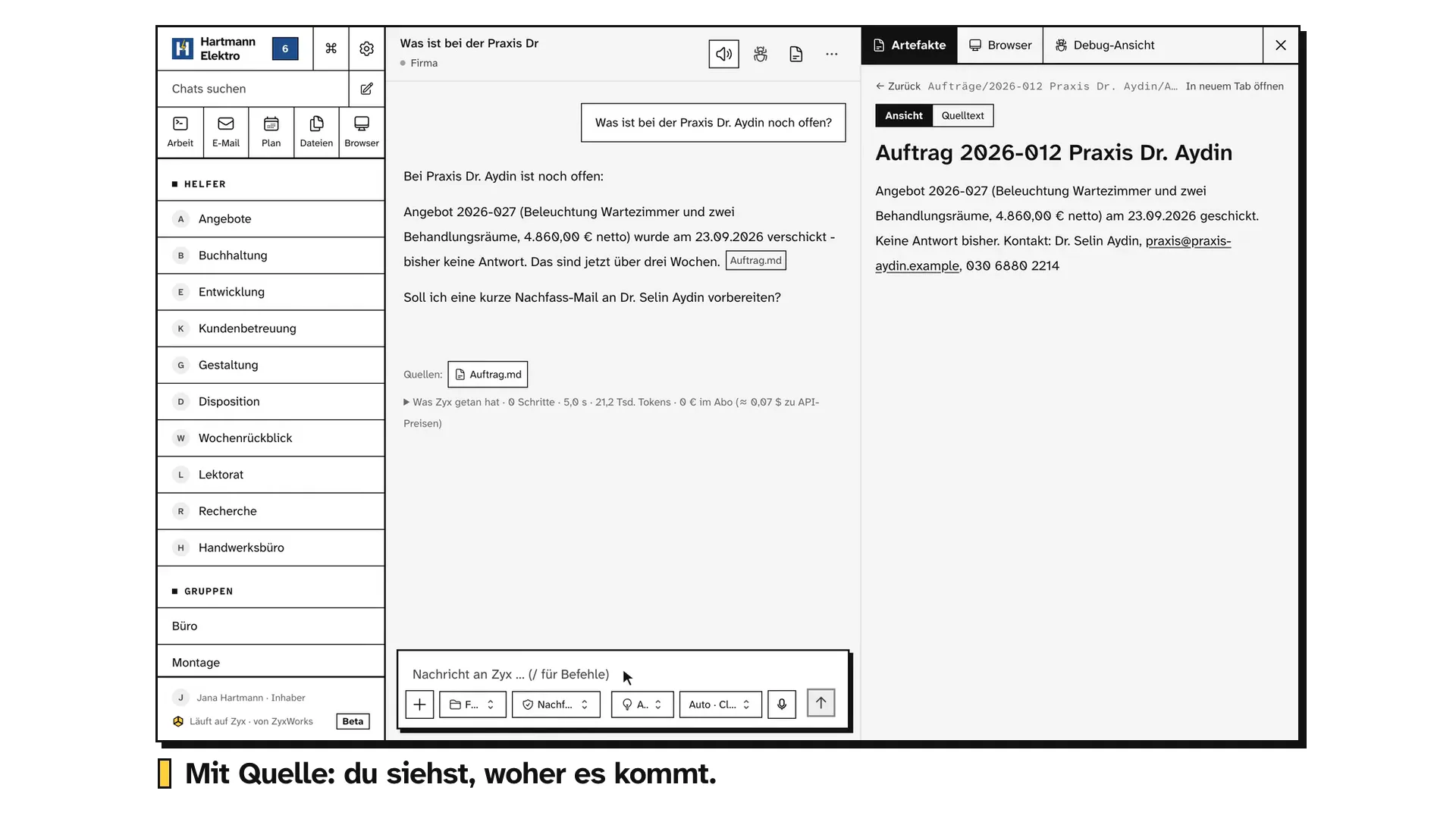
Zyx answers where the company stands with the bakery Sommer: site visit done, quote ready but not sent yet, the customer wants it by Friday, and the fitter in charge is off sick. Sources from notes, the quote and mails. One click opens the quote.
Recorded in Zyx, with sample data. Wait cut short.

Ready-made skills for the whole office.

A skill is a page of steps Zyx follows to do a job. More than 100 are ready, sorted by department. In the 90 days we set up one process. The rest is ready when you are.

  • Office and accounts

    Supplier invoices

    Collects invoices, checks mandatory fields, flags doubles and changed bank details. Never books, never pays.

    Ready

  • Office and accounts

    Sort the inbox

    Only mail that needs a person stays. Drafts, never sends.

    Ready

  • Office and accounts

    Contract renewals

    Contract register, warns before the last day to cancel.

    Ready

  • Quotes and sales

    Offer PDF

    The quote as a PDF in the company folder.

    Ready

  • Front office and reviews

    Handle a complaint

    A calm reply draft with the next step, and an internal note. A refund only when your rules allow it.

    Ready

  • Data protection and legal

    GDPR access request

    Deadline logged, identity checked first, data from all systems, answer on an approval.

    Ready

  • Knowledge and team

    Answer from files

    Answers a question from chosen documents, with source links.

    Ready

  • Research

    Find funding

    Public funding for a named project, federal and state.

    Ready

As a pack for your department or industry.

A pack brings the skills of one department or industry, their routines and one agent. One click installs it, one click takes it back as long as you have not changed it. If it brings routines, you approve them with a second click. More than 30 packs are ready, for example:

  • Trades

    Your site visit notes become a measured sheet with its formulas and a calculation from your price list. On Monday you see which jobs are stuck.

  • Tax firm

    Each week you see which client still owes which documents, with a reminder draft. Dates from new notices arrive as proposals a person confirms. No tax advice.

  • Property management

    A damage report becomes a craftsman order and a reply to the tenant, both as drafts. The service charge statement is worked out again before it goes out.

  • Bookkeeping prep

    On Monday you know who still owes you money. Plus reminder drafts and every outgoing invoice checked before it leaves. No bank access needed.

Explore the full library

Every pack with its agent and routines, every skill with its status and the connection it needs.

Connects to your apps.

Files, mail over IMAP, Notion and HubSpot are live-proven. For the apps below, connections exist. Zyx shows the status of each connection, and you set what Zyx may do in each app.

HubSpot against the order

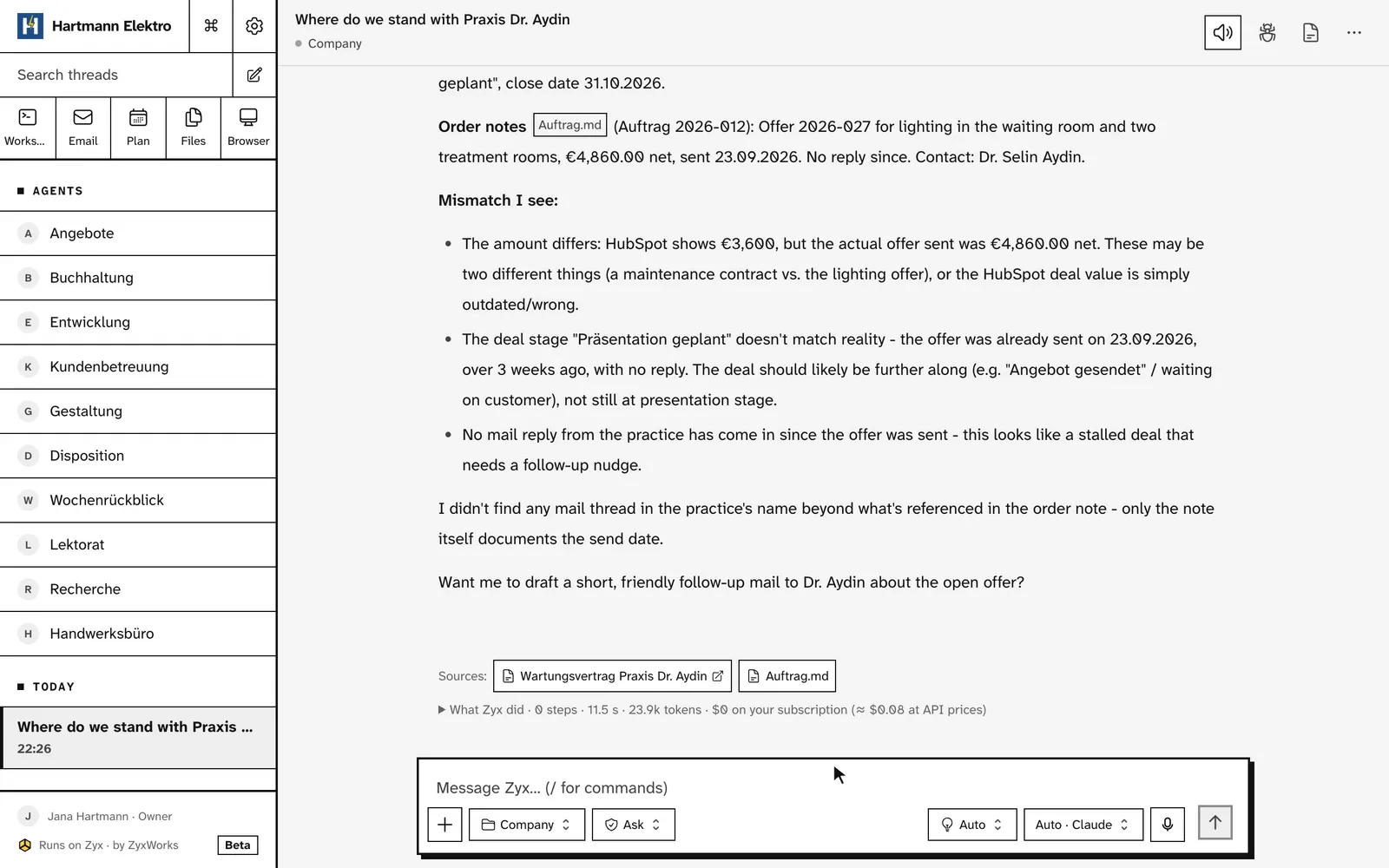
The HubSpot deal names a different amount than the quote in the company folder that went out. Zyx finds the gap and shows where each fact comes from.

Zyx compares the HubSpot deal for Praxis Dr. Aydin with the order: HubSpot names a smaller amount than the quote that went out, and the order notes no reply in three weeks. Each fact with its source.
Recorded in Zyx, with sample data. Wait cut short.

An app with + opens what Zyx does with it: skills, routines and agents from the library.

  • Google Drivein search
  • Google Calendarin search
  • Dropbox
  • Box
  • Asana
  • Airtable
  • Calendly
  • Slack
  • Salesforcein search
  • Microsoft 365in search
  • ClickUp
  • monday.com
  • Todoist
  • Apollo
  • Figma
  • Miro
  • Webflow
  • Square
  • Wix
  • Telegramsoon
  • WhatsAppsoon
  • Your app is missing?We build it during the setup.

Zyx itself shows more than 60 connections.

One question across your apps.

Zyx searches mail, files, Notion and HubSpot and answers with sources. One click opens the file at the right place. On request the answer becomes the mail.

  • Word, Excel, PowerPoint, PDF and scans
  • Each person sees only what they may
  • Private chats for your own mailbox
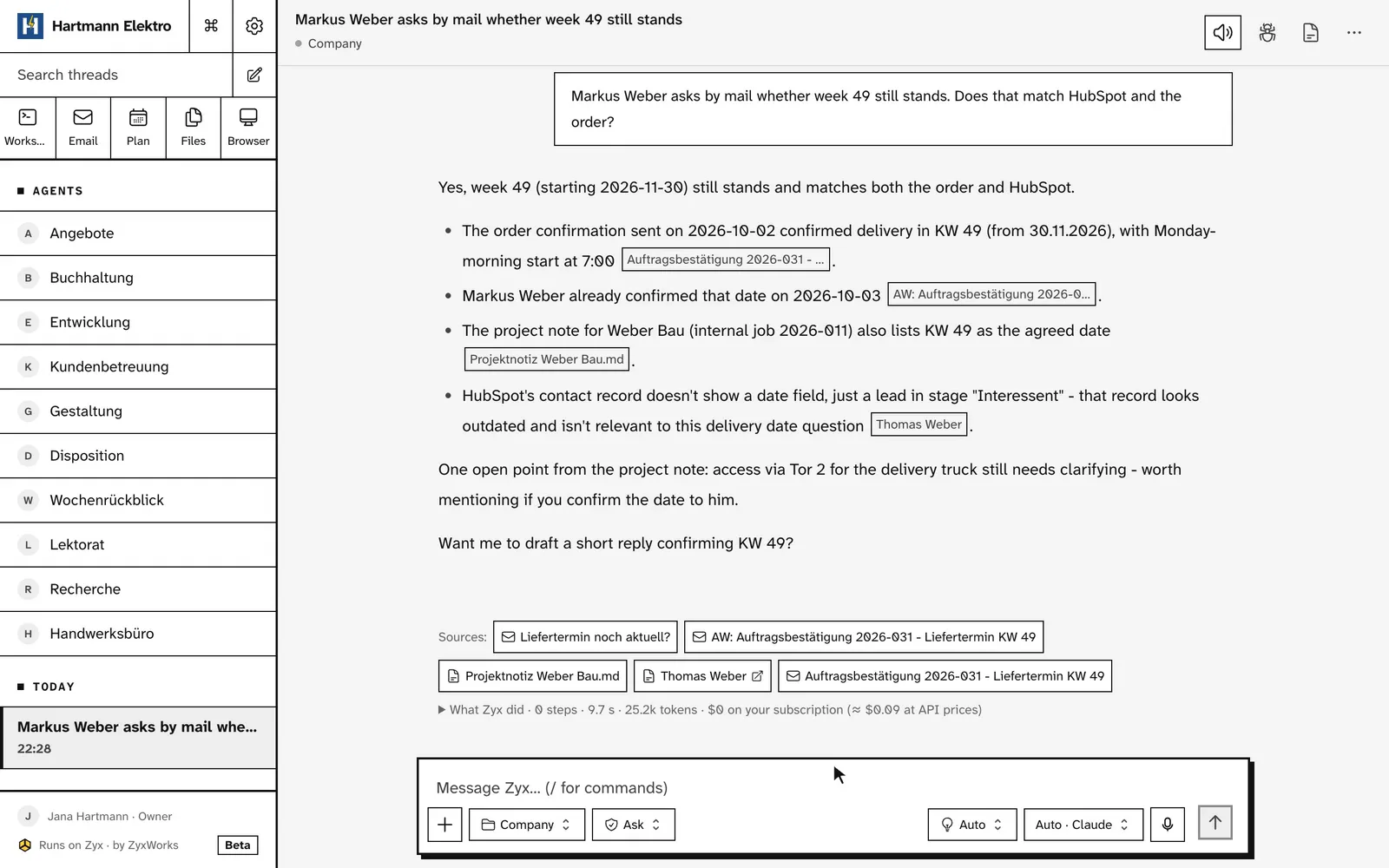
Zyx checks whether week 49 still stands for Weber Bau: the order confirmation, Mr Weber in his own mail and the project note agree, and HubSpot shows the contact. Each fact with its source. Then Zyx drafts the reply to Mr Weber and shows it for sending.
Recorded in Zyx, with sample data. Waits cut short.

No mail and no risky change without your yes.

Before a mail or risky change, you see exactly what will happen. Approve, edit a word or reject.

  • Approve from your phone too
  • Approvals go to the responsible person
  • Every action says honestly whether undo is possible
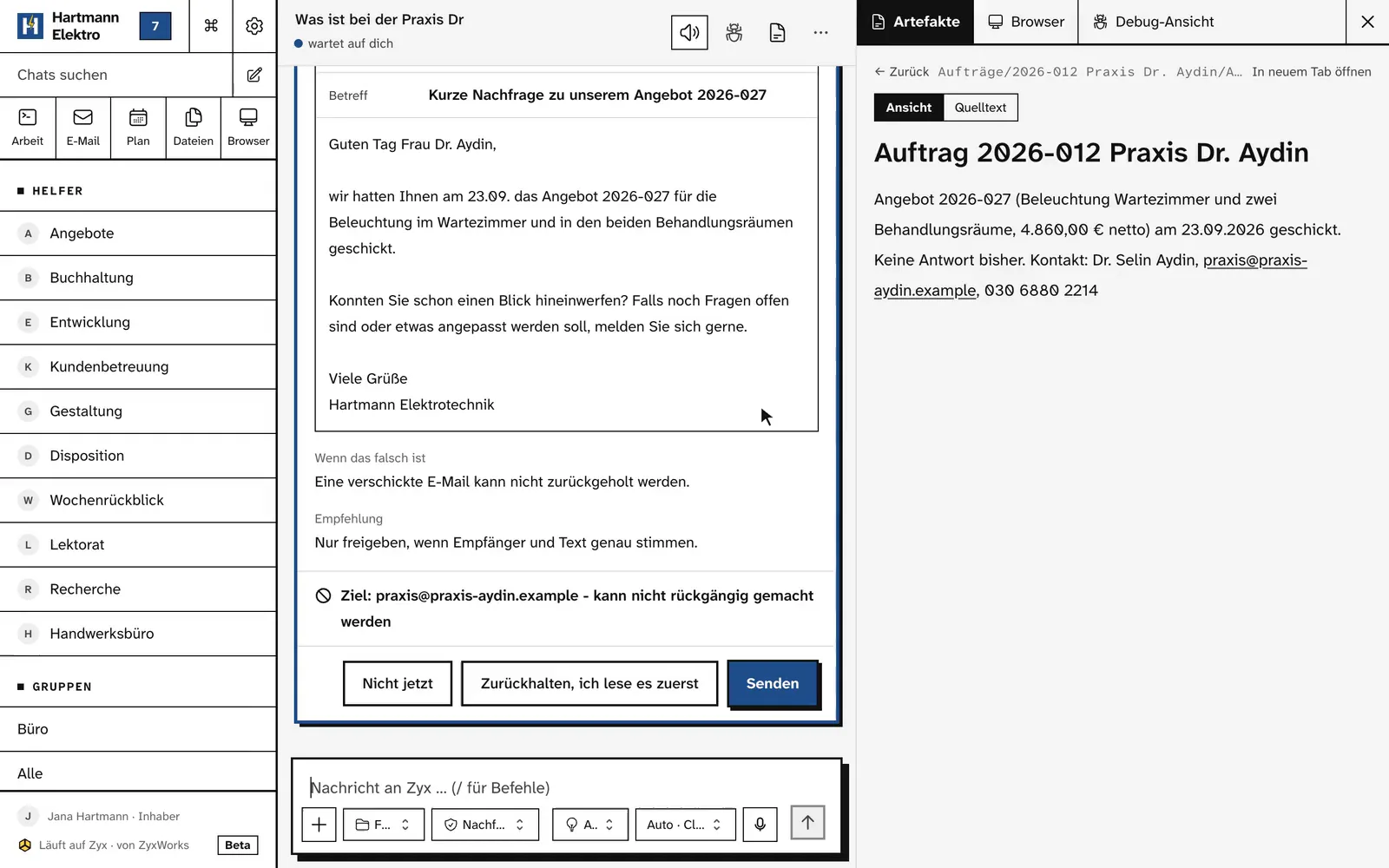
An approval in Zyx: a mail draft is read, its closing is changed, and the mail goes out only after the press on send.
Recorded in Zyx, with sample data. Wait cut short.

One agent per job. With hard limits.

One job, clear rights and a monthly budget. Zyx checks these limits on every call.

  • Describe one in a sentence. Zyx proposes the rights, you set the monthly budget yourself
  • Can, asks first or never
  • Never more rights than the person it works for
  • Every pack brings its own agent. It spends no money, and mail goes out only after your yes
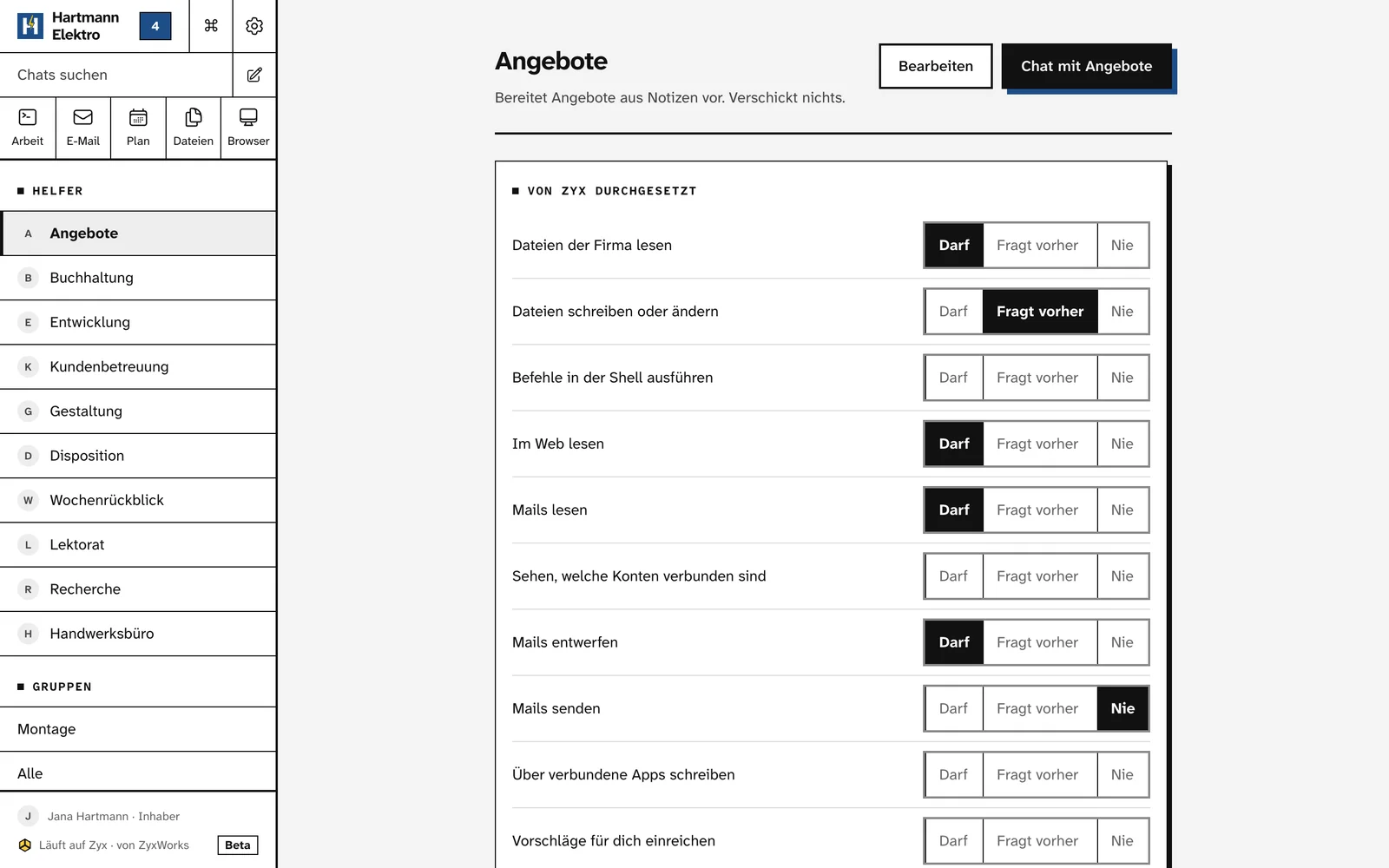
The page of the agent Angebote in Zyx: each right is set to can, asks first or never. It can draft mail and never sends it.
Screenshot from Zyx, with sample data.

Work that starts after your yes.

A skill plus a time or event. It runs alone only after you have read and approved its limits.

  • Morning brief, open items on Monday, job schedule on Thursday
  • A budget per routine
  • Runs while your server is on and online
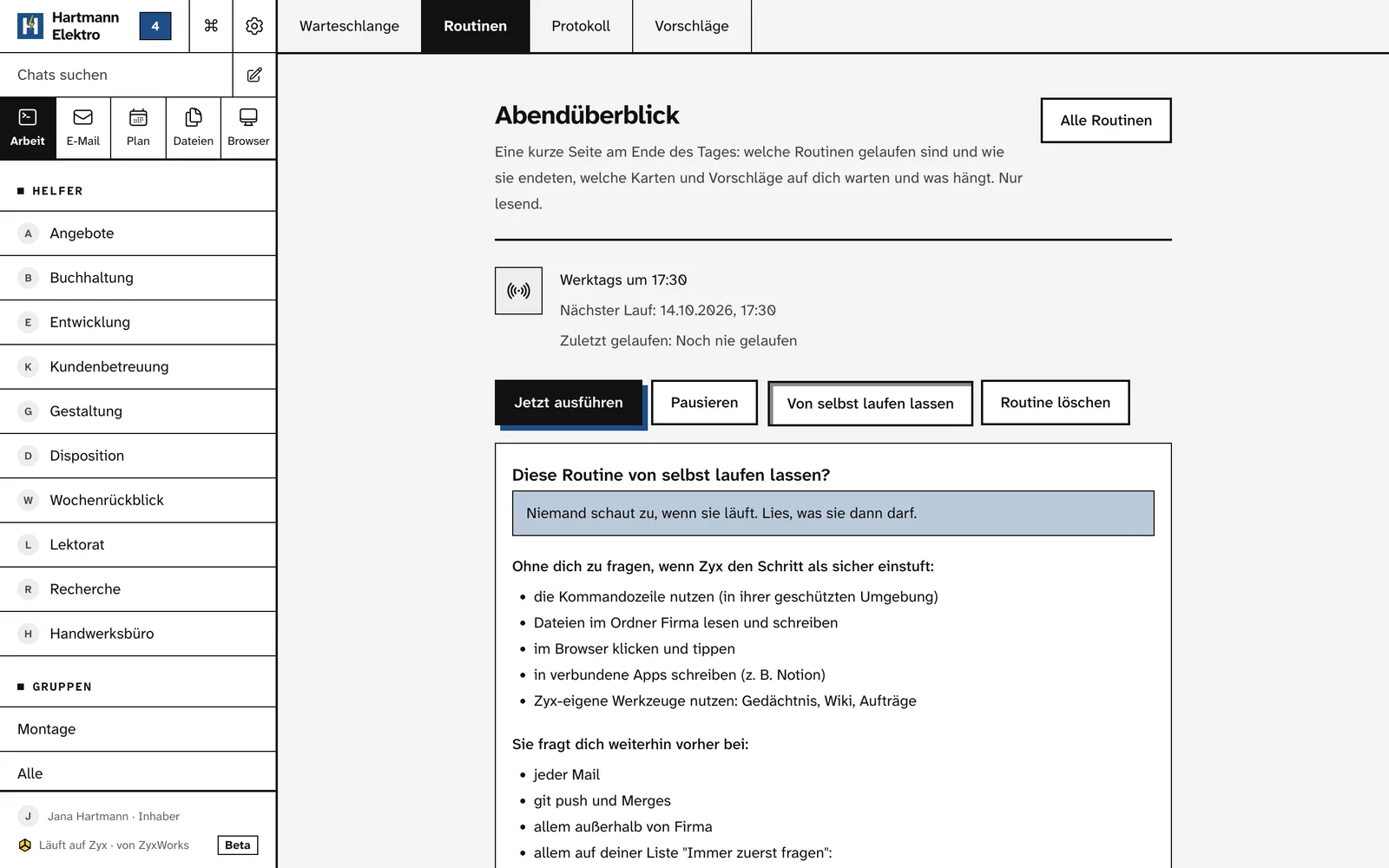
The evening digest routine in Zyx, weekdays at 17:30. Below it the question whether it may run by itself: what it then does without asking and where it still asks.
Screenshot from Zyx, with sample data.

All your tasks and events in one place.

One board and one calendar for your work. Tasks and events stay in the tools your team already uses. Zyx reads them and shows them together. Before Zyx changes anything there, it asks you.

  • Your own tasks in Zyx. Linear, Jira, Google Calendar, Asana, ClickUp, Todoist, Notion and monday.com can be connected, and we set up the first live connection with you
  • On the board on request: HubSpot and Outlook
  • Write down what is on your plate. Zyx puts it as blocks into your free working hours
  • Hand a task to Zyx or an agent. You stay responsible
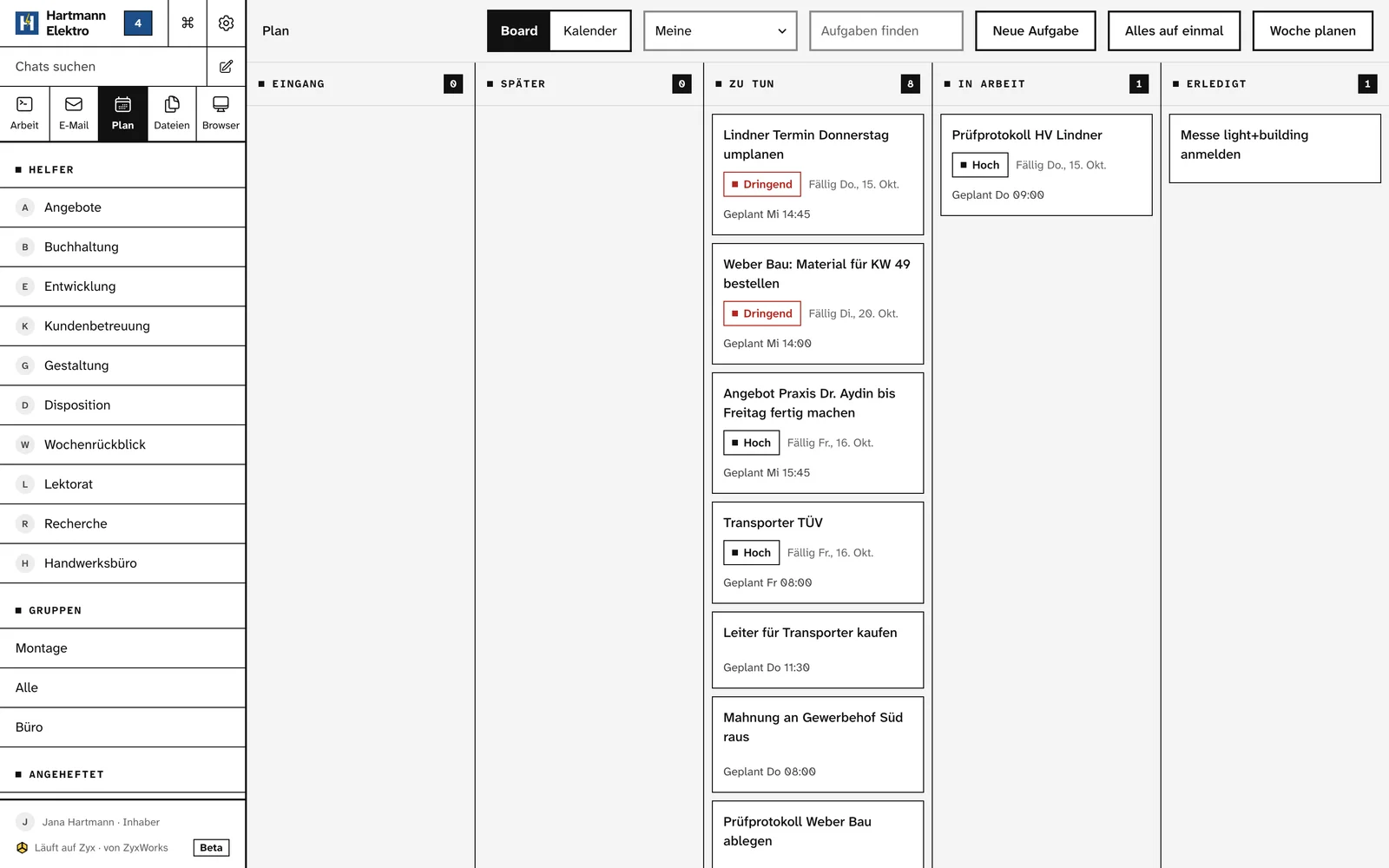
The plan in Zyx as a board: tasks in to do, in progress and done, each with its urgency, due date and planned time block.
Screenshot from Zyx, with sample data.

Zyx has a browser. You watch.

It opens pages, reads, clicks and fills forms. You see its steps and take over to sign in.

  • A separate browser for every chat
  • Take control and hand back from your phone too
  • Zyx does not store your password or pass it to the model
  • Stop remains within reach
Zyx is asked to fetch an invoice from a sample portal. It opens the portal in its browser, the person takes control, signs in and hands back. Then Zyx carries on.
Recorded in Zyx, with sample data. Wait cut short, the sign-in played faster.

Everything lives in one folder. On your server.

Files open inside Zyx. A question on a PDF line gets an answer with a source. Scan a letter with your phone, and Zyx gives it a name and files it in the right folder by your filing rules.

  • Everyone has a private Inbox for scans, photos and files. Nothing leaves it before your yes
  • Photos of a letter become one PDF with upright pages
  • A bill becomes a task with its due date. Zyx never pays
  • Rules and readers for every folder
  • Every version Zyx writes is kept
The company folder in Zyx: in the quote to Weber Bau the line Steckdose UP is tapped with the question whether the price still matches the 2026 price list. Zyx answers in the comment, with the price list as its source.
Recorded in Zyx, with sample data. Wait cut short.

Pictures, video and sound. Free first.

Subtitles, short clips and product photos from your own recordings. What costs money, Zyx shows first as a choice with its price.

  • The free option always comes first
  • Nothing runs before you answer
  • Every AI file is labelled
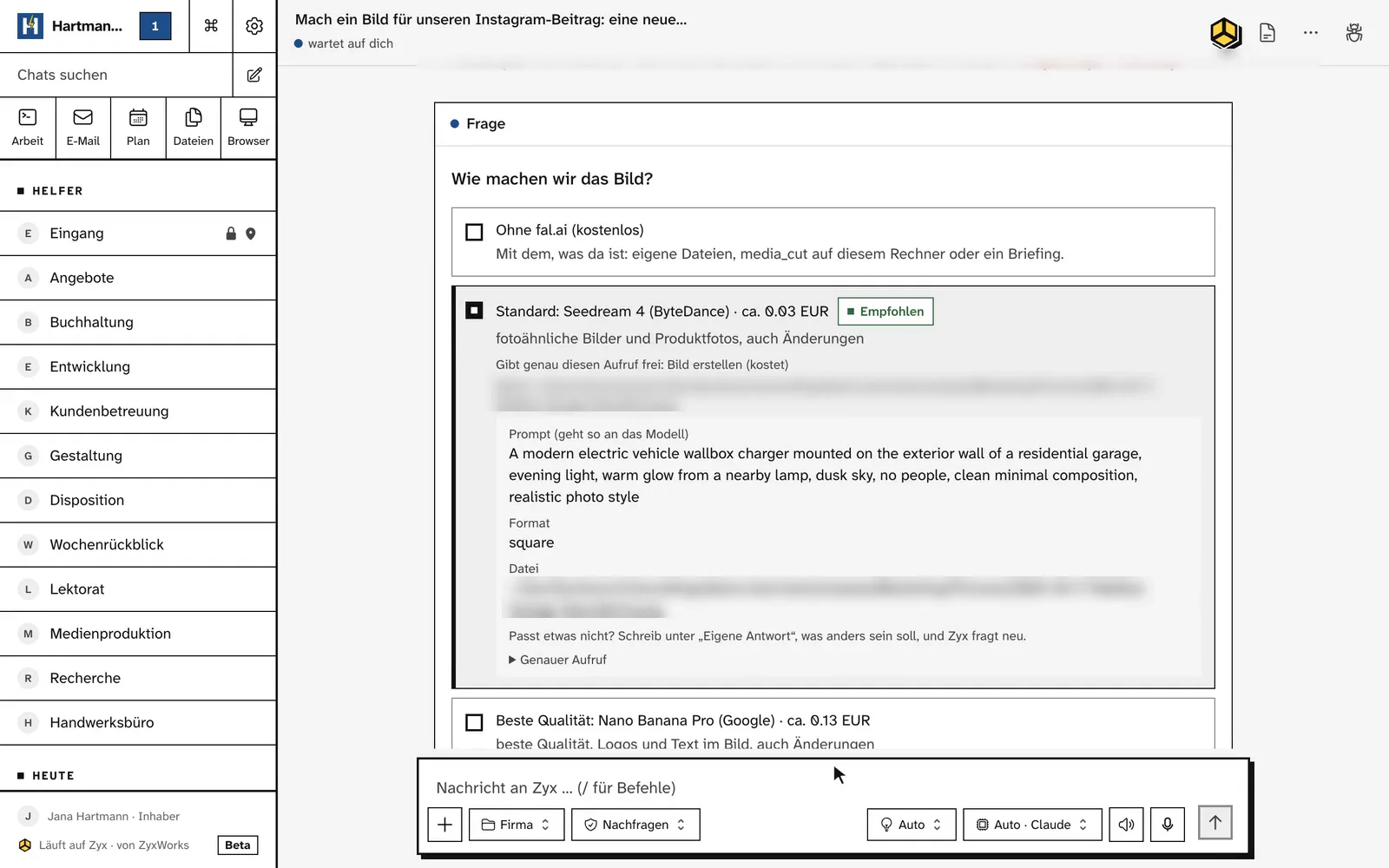
Zyx is asked for a picture for an Instagram post and asks first: free without fal.ai, using what is already there, or one of two models for about 3 or 13 cents. Nothing runs before you answer.
Recorded in Zyx, with sample data. German UI. Wait cut short, save path blurred.

Zyx at work.

Recordings from a real Zyx install, with sample data. No customer data.

The film

Zyx in short: find, do the work, ask first.

Recorded in Zyx, with sample data. German captions. Waits cut short, the sign-in played faster.

One process, start to end

Question, source, mail draft, your yes, sent.

Recorded in Zyx, with sample data. Three waits cut short.

What else comes with it.

Connections
You set each tool’s rights. Remove an app and its tools disappear.
Memory
Zyx remembers what matters from your chats, also by itself. Every line can be read, edited and deleted, including the ones Zyx noted by itself, and shows where it came from. It learns nothing from private chats.
Cost control
Your API key, spending limit and bounds per company, agent and routine.
From your AI tool
Works from Claude Code over MCP. The same rights and approvals.
Voice and phone
German and English. Voice input runs locally on your server, soon on Linux too. The workspace is on your phone over your private network.
Mark and ask
Mark text in a mail, an answer or a file and ask Zyx about it. The chat knows what you marked.

Your workspace stays on your server.

Files, search, chats and keys live on your server. Needed text goes to your chosen cloud model after a filter checks it there. An EU route or a local model is possible. Approved app calls go to the app they are for and web searches to the open web, both after the same filter.

The filter lowers the risk. It is not a guarantee.

With a local model, no text goes to a cloud model.

How Zyx protects your data, in the docs
  • Set up backups with restore checks
  • Commands in an isolated box
  • Keep a folder out of search with one click
  • Record of processing, TOM list and DPA draft

Your server

  • Zyx

    chats, skills, routines

  • Files

    the company folder

  • Search

    mail, files, apps

  • Keys

    access to your apps

Filterchecks everything that leaves the server

  • API keysk-ant-api03-…refused
  • IBANDE89 •••• •••• •••• •••• 00masked
  • Card number4111 •••• •••• 1111masked

Keys everywhere, also in files Zyx opens. IBAN and card numbers in search, messages and outgoing calls.

Only the text the model needs

The result is checked on its way back

Model, chosen by you

  • Cloud

    after the filter

  • EU

    EU route, after the filter

  • Local

    on your server, nothing leaves

One process. Three stages. 90 days.

A person leads the setup. We come to your office, watch real work, run interviews and build. Zyx gathers evidence and counts by kind of task, never by employee.

  1. Audit

    We observe and confirm the process with the people who know it. You get the operating map: today, after, one use case, limits and expected value.

  2. Evals

    We test Zyx against real cases from your work before it goes live. You get an evaluation report: what passed, what failed and why.

  3. Deployment

    Real data, approvals, an audit log and a way back. More freedom only after the cases match. You get a running process, the runbook and a responsible owner.

At the end you have the operating map, system architecture, evaluation report, deployment controls and business case. Each stage finishes before the next starts. After day 90 you run the process yourselves.

90 days. Fixed price. Set up on site.

Private beta, by application. One real, recurring process, named by you.

  • Zyx on your own server, set up by us with you.
  • Your time: about 3 hours on install day, then about 20 minutes each week.
  • One fixed price for the setup, agreed before we start. Lower for beta companies than after the beta. If your process does not run in the first 30 days, you get the money back.
  • You pay your own model costs, with your own key and spending limit.
  • After 90 days you run the process yourselves. No automatic renewal.

You need a server with at least 16 GB of RAM that stays on and online, an IMAP mailbox with an app password and someone who may decide.

Read beta terms

One short sentence is enough. Please do not include customer data, passwords or confidential documents.

Plain answers.

What to know before the call.

Where does my data live?

On a server that belongs to your company. We decide together during setup where it stands. Files, search, chats and keys live there. Only the text the cloud model needs, approved app calls and web searches leave the server, all of them after the privacy filter. The filter lowers the risk. It is not a guarantee.

Which AI model answers?

The cheapest one that can do the job. You use your own API key with a spending limit. An EU-only route or a local model is possible. A ChatGPT or Claude subscription does not work here.

Who installs Zyx?

An engineer from ZyxWorks, at your office. There is no download. On install day we need about 3 hours of your time, then about 20 minutes each week.

Does Zyx then run on its own?

Not at the start. A mail always asks, and every risky change waits for your yes. For everything else a risk check decides whether Zyx asks. When it is unsure, Zyx asks. Autonomy goes up step by step, only after the test cases match. A high-risk action always goes to a person.

What does it cost?

The 90 day setup has one fixed price. We agree it before the start. In the beta it is lower than after it. If your process does not run in the first 30 days, you get the money back. You pay your own model costs. Nothing renews by itself.

Does Zyx replace our apps?

No. Zyx uses your apps for you. Your accounting, your CRM and your mailbox stay as they are. Many apps have a direct connection. Where there is none, Zyx can use the app in the browser, and it asks before every risky step. Zyx itself runs on your own server, and your people use it in the browser from any computer, Windows included.

Do we have to switch our task tool for the plan?

No. Tasks and events stay where they are. Zyx reads them and shows them on one board and in one calendar. Your own tasks in Zyx work right away. Linear, Jira and Google Calendar can be connected: the connections are built, and we set up the first live one with you. We put ClickUp, Todoist, Asana, Notion, monday.com, HubSpot and Outlook on the board on request. How Zyx plans is written in a skill you can edit.

What about data protection and the works council?

Zyx generates a record of processing, a TOM list and a DPA draft from your install. Before the install we sign the beta terms, a DPA and the licence. You can read all three beforehand.

More answers in the docs

You talk to a person.

In the beta we set up every install on site.

We come to your office, look at the work and build the process with you. If something does not work, you have one fixed contact. Fifteen minutes on the phone. Then you know whether Zyx fits your company.

Apply for the beta